

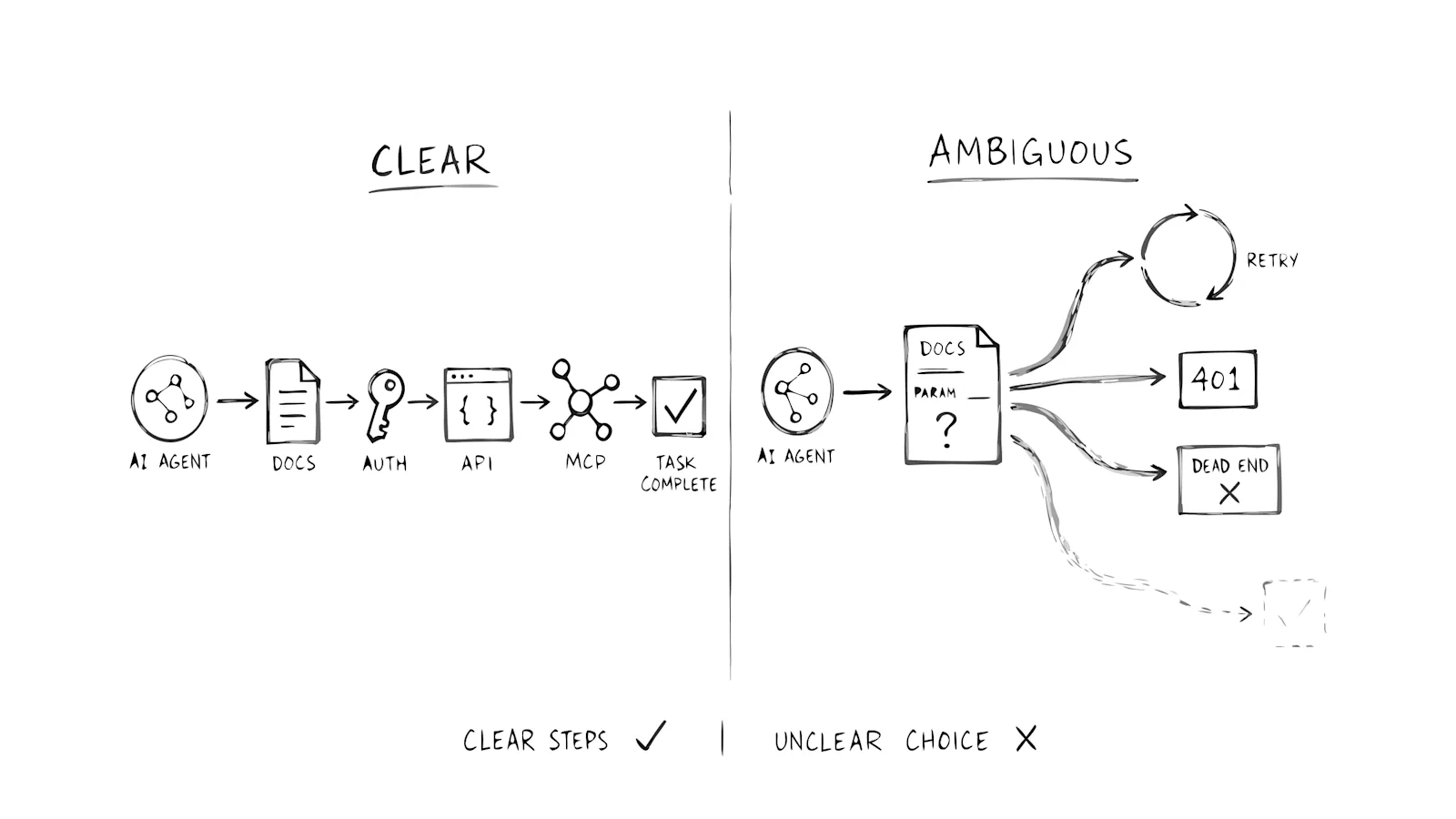
Give an agent seven explicit steps and it will usually finish. Give it one sentence that says "pass the appropriate ID" and the job stalls, even if that path is a single request.
I have sat with teams that cut signup from nine clicks to four and still lost the agent. The shorter path was not clearer. It just hid the same missing noun behind a prettier button. I would rather ship a longer, boring sequence than a short one that forces a guess.
Fewer clicks is a human UX goal. Ambiguity is the agent failure. The rest of this is about that gap, not about making your UI thinner.
Fewer clicks was never the agent problem
For years you measured a good flow by how little a person had to do. Fewer fields. Fewer screens. A progress bar that jumped. That logic holds when someone is scanning a page and moving a mouse.
An agent never touches the mouse. It reads a sentence, picks a next action, and interprets the response. Five API calls in three seconds is cheap if each call has one obvious next step. One vague instruction is expensive. The agent sits there generating candidates for what you meant.
Reducing clicks solves a speed problem for hands. Reducing ambiguity solves a decision problem for software. When the user is software, the decision problem is the one that matters.
What ambiguity looks like to an agent
Ambiguity is any moment where the agent cannot tell what the correct next action is. The system would accept a valid request. The agent cannot assemble that request from what you published.
That is not a bug. A bug means the right call fails. Ambiguity means the door is open and unlabeled.
You will see the same four shapes on developer products:
- Semantic: "Workspace" in the docs is a team. In the API body it is a project folder.
- Procedural: Auth returns 200. Nothing says which endpoint to call next.
- Outcome: The response is a 200 with a partial object. Did the write land?
- Scope: A tool "manages resources" and never names which resources or which verbs.
A person infers. An agent guesses. Guessing looks like retries, then silence.
Two paths, same job
A payments agent needs to attach a customer to a checkout session.
Path A is long. Create a customer. Read back customer_id. Create a session with that id. Confirm the session status is open. Retrieve the session if the first read is empty. Five calls. Every field named. Every error tells you which field was wrong. The agent finishes in a few seconds and never opens your UI.
Path B is short. One paragraph: "Create a session with the appropriate customer reference." One endpoint. The agent sends customer, then customerId, then customer_ref. You return 400 Bad Request each time. The path had fewer steps. It also had no correct next action. After the third 400, the agent tries another vendor whose example uses a literal cus_123.
Your dashboard may call Path B more efficient. The agent does not. It experienced a wall dressed as a shortcut. A human would have scrolled up, found the customer object, and inferred the field. The agent does not get that courtesy, and it will not ask you in Slack.
Where the unclear line usually sits
Docs written for a person who will scroll up
Most docs assume visual scanning. "Pass the ID from earlier." A human scrolls. An agent reads the sentence as complete and fails. Name the resource. Name the field. Say where it comes from. If two IDs appear on the page, say which one. "The ID" is how Path B starts.
Auth that waits for a face
Redirect consent, CAPTCHAs, and "check your email" assume eyes and hands. The agent cannot click Authorize. In your logs this is a 401 or a dropped session. Agents fail silently here more often than they fail on a down endpoint.
Errors that do not point forward
Something went wrong ends the attempt. Missing required field: project_id gives the agent a repair. You already know this for human support. Agents need it more, because they will not open a ticket.
Tools with a slogan instead of a contract
"Handles data operations" is a homepage line. An agent selecting a tool needs inputs, outputs, and a boundary. If two tools could both be right, the agent picks at random or skips both.
What your analytics records instead
What you optimized | What the agent needed |
|---|---|
Fewer screens, fewer fields | One obvious next action |
Faster time-to-first-click | Named IDs, typed fields, recoverable errors |
A shorter happy path | A path that can be followed without inference |
Session duration | Whether the job finished or stalled |
Standard analytics still records fragments: a docs fetch, a 401, three 400s. It does not record the missing noun. You see traffic. You do not see the sentence that stopped the work.
How to reduce ambiguity
Keep these short. Each one is a surface habit, not a program.
- Write the ID, the type, and where it comes from. "Resource ID" is not a parameter.
- Ship a credential path that does not need a browser. Document the exact header and the exact error when it is missing.
- Return errors that name the field and the next call. A code plus a pointer beats a vibe.
- Describe each MCP tool as a contract: what it does, what it requires, what it returns. "Manages resources" is not a contract.
Do those four and you will still have bugs. You will have fewer stalls that look like bugs.
What to watch without turning this into a scoreboard
You can have green endpoints and a stuck agent. High API success and a failed job can live in the same hour. The calls succeeded. The overall job did not.
Analytics for agent users is the place for Agent Task Completion Rate. Here the point is narrower: if you only count clicks or 200s, you will keep shortening the wrong thing.
A long, explicit path is not friction for an agent. An unlabeled choice is. If you are still counting clicks, you are measuring a user who is not in the room. Count the guesses instead.
Frequently asked questions
How is ambiguity different from a bug?
A bug blocks the correct action. Ambiguity hides what the correct action is. The endpoint may be fine. The agent still cannot tell which ID, which header, or which tool to use.
How is Agent Task Completion Rate different from API success rate?
API success rate scores one call. Agent Task Completion Rate scores whether the multi-step job finished. You can bat 1.000 on status codes and still lose the job.