

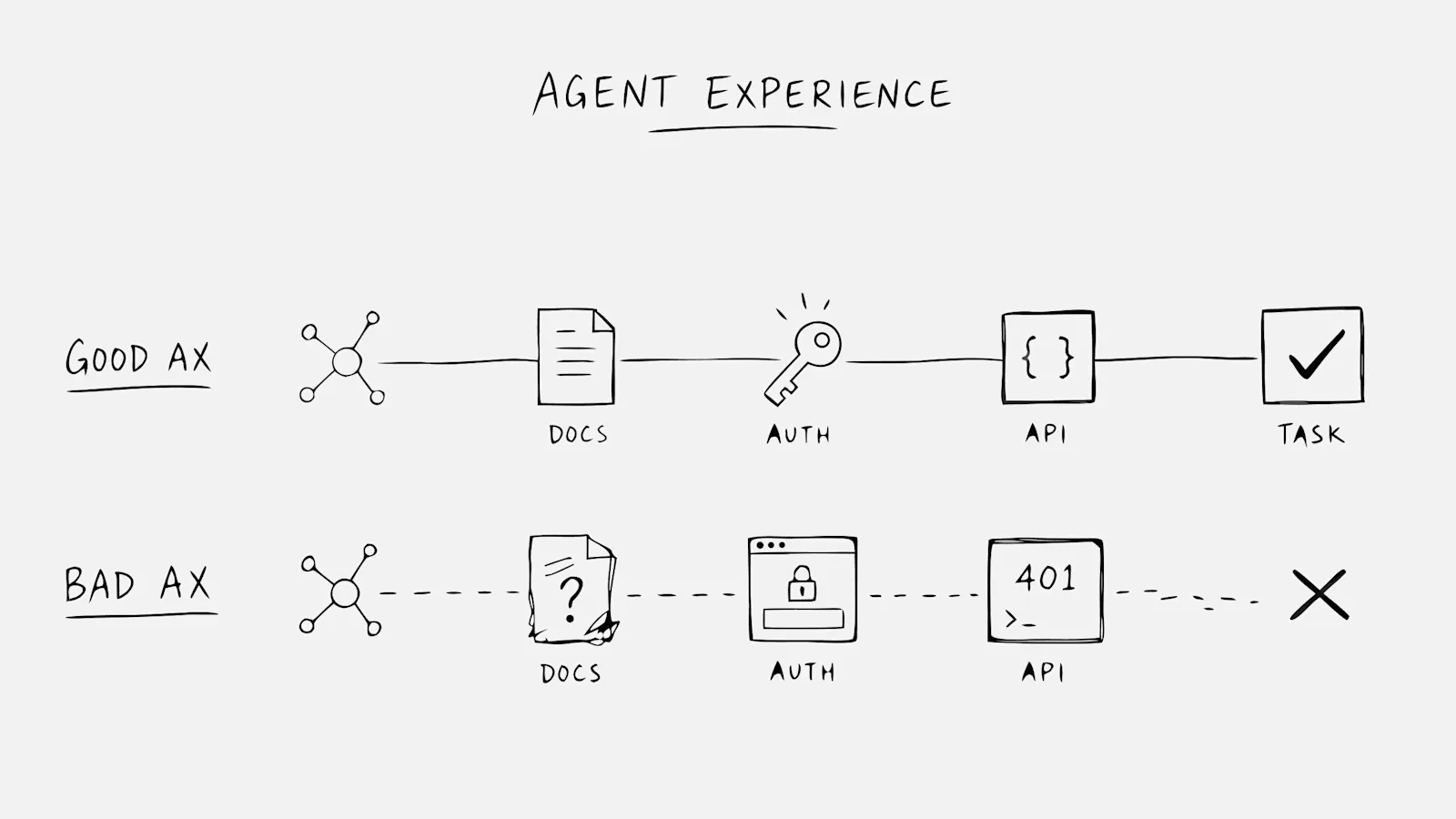
Agent Experience (AX) is how AI agents interact with your product's public surfaces when completing tasks on behalf of humans. An agent reading your docs, hitting your auth flow, and calling your APIs is a user, just not a human one.
Most products were designed before agents became real users. The friction that a human clicks through becomes a dead end for software that cannot improvise. This article covers what AX means, why it matters now, how it differs from developer experience and customer experience, and how to measure and improve it for developer tools.
What Agent Experience (AX) Means
Agent Experience (AX) is the overall quality of how AI agents interact with the digital tools, data, and workflows they encounter when completing tasks. You might have heard "agent experience" in the context of contact centers, where it refers to how human support staff feel about their jobs. That is a different concept entirely. Here, AX describes how autonomous software agents perceive and operate within your product's public surfaces: documentation, authentication flows, APIs, and tool protocols like MCP.
An AI agent is software that acts on behalf of a human to complete a task. When a developer asks a coding assistant to integrate a payment API, that assistant becomes an agent user of the payment provider's product. The agent reads docs, attempts to authenticate, calls endpoints, and either finishes the job or fails silently. It has no opinion about your brand. It only has an outcome.
Why Agent Experience Matters Now
AI agents are already reading documentation, calling APIs, and evaluating products on behalf of humans. This is happening today on developer platforms, infrastructure products, and API-first tools. The shift is quiet because conventional analytics filter agent traffic out as bot noise or record it as fragmented sessions with no clear intent.
Products designed only for human users create friction that agents cannot work around. A human can puzzle through ambiguous docs or click through an OAuth redirect. An agent facing the same obstacles will retry a few times, guess at the right approach, or quietly switch to a competitor whose surface was easier to parse. No support ticket. No lost-deal reason in your CRM. The opportunity ended before your funnel started.
Teams optimizing human funnels may be losing agent-driven demand without any signal in their dashboards. That is the gap AX addresses.
Agent Experience vs Developer Experience vs Customer Experience
How AX Extends Developer Experience
Developer Experience (DevEx) optimizes for human developers reading docs and writing code. Good DevEx means clear tutorials, helpful error messages, and fast time-to-first-integration for a person sitting at a keyboard. The human can ask a clarifying question in Slack, improvise around a missing example, or guess what you meant by "see above."
AX extends DevEx to the agent that reads the same docs and calls the same APIs. The difference is that an agent cannot improvise. Every ambiguity becomes a potential failure point. If your docs assume a reader will infer meaning from context, the agent will guess wrong or abandon the task.
How AX Differs From Customer Experience
Customer Experience (CX) measures human satisfaction and sentiment. You survey customers, track NPS, and watch for churn signals. The human customer has feelings about your product.
AX measures whether an agent completed its intended task. The agent has no feelings. It either succeeded or it did not. That binary outcome, aggregated across all agent attempts, becomes your Agent Task Completion Rate.
Dimension | Developer Experience (DevEx) | Customer Experience (CX) | Agent Experience (AX) |
|---|---|---|---|
Primary user | Human developer | Human customer | AI agent |
Success metric | Time to first integration | Satisfaction score | Task completion |
Feedback signal | Support tickets, surveys | Reviews, churn | Silent success or silent failure |
Design priority | Clarity for humans | Ease and delight | Machine-readability and predictability |
What the Agent Journey Looks Like Across Docs, Auth, APIs, and MCP
The agent journey is the sequence of surfaces an agent touches when attempting a task. Picture an agent trying to integrate your API into a customer workflow. It reads your docs, hits an auth endpoint, calls two API methods, and maybe invokes an MCP tool. All of that happens as one job, often in seconds.
This is not a human funnel with pageviews and form submits. Your analytics tools record bot noise, fragmented sessions, and a few 401s. The task itself never appears.
Documentation the Agent Reads
Agents parse documentation to understand what your product can do and what parameters each endpoint expects. Prose-heavy docs that assume a human will "get the gist" cause agents to guess or abandon the task entirely.
What works for agents is structured, explicit documentation: parameter types spelled out, valid values listed, examples that show exact inputs and outputs. If your docs say "pass the appropriate value," an agent has no way to know what values are appropriate.
Authentication the Agent Hits
OAuth flows designed for browsers create dead ends for agents. A redirect to a login page, a CAPTCHA, or a cookie-based session stops an agent cold. The agent cannot click through a consent screen or solve a visual puzzle.
Agents work best with token-based or machine-friendly auth paths: API keys, service accounts, or OAuth flows that do not require a browser redirect. Clear scopes and error codes tell the agent exactly what went wrong and what permissions it lacks.
APIs the Agent Calls
Agents rely on predictable responses and clear error messages. When an endpoint returns "Something went wrong" without a machine-readable error code, the agent has nothing to act on. It might retry indefinitely, guess at a fix, or give up.
Undocumented edge cases cause silent failures that never surface in your logs as meaningful signal. If your API returns different structures for similar endpoints, agents will misinterpret responses and produce incorrect results.
MCP Tools the Agent Tries
MCP (Model Context Protocol) is a standard that exposes tools agents can invoke directly. If your product offers an MCP server, agents can call specific functions with typed inputs and outputs. The agent knows exactly what the tool does, what it expects, and what it returns.
If MCP is unavailable or poorly scoped, agents fall back to less reliable methods like scraping docs or guessing at API behavior. Overly broad tools confuse agents. Missing tools force workarounds that may fail unpredictably.
What Makes a Good Agent Experience
A good agent experience lets an agent complete a task without human intervention. Four qualities matter most.
Machine-Readable Documentation
Structured formats, explicit parameter descriptions, and unambiguous examples. If a human would need to "read between the lines," an agent will fail. Avoid prose that requires inference. Spell out what is valid and what is not.
Agent-Friendly Authentication
API keys, service accounts, or OAuth flows that do not require a browser redirect. Clear scopes and error codes that tell the agent exactly what went wrong. If the agent lacks a permission, the error message says which permission and how to request it.
Predictable and Discoverable APIs
Consistent naming, typed responses, and documented error states. Agents cannot guess intent from inconsistent behavior. If one endpoint returns { "data": [...] } and another returns { "results": [...] }, the agent has to handle both cases or fail on one.
Available and Well-Scoped MCP Tools
MCP servers that expose core tasks with clear inputs and outputs. Start with the tasks agents attempt most frequently. Overly broad tools that try to do everything confuse agents. Missing tools force agents into workarounds.
Why Most Agent Experiences Fail Today
Most products were designed before AI agents became real users. The result is a set of common failure points:
- Docs written for human scanning: Agents need explicit structure, not headers and prose that assume a reader will infer meaning
- Auth assumes a browser: OAuth redirects, CAPTCHAs, and cookie-based sessions block non-human users entirely
- Errors lack machine-readable context: Generic error messages give agents nothing to act on
- No MCP or tool exposure: Agents reverse-engineer behavior from API responses, which is slow and error-prone
- No visibility into agent traffic: Teams cannot see where agents fail because analytics filter out bot activity or record it as noise
The agent that fails on your product does not file a support ticket. It switches to a competitor and completes the task there.
How to Measure Agent Experience With Agent Task Completion Rate
Agent Task Completion Rate is completed agent tasks divided by agent tasks started. This single metric captures whether your product works for agent users.
Measuring it requires reconstructing the task across multiple surfaces. An agent might read three doc pages, hit an auth endpoint, call two API methods, and invoke an MCP tool, all as one job. Conventional analytics record fragments (pageviews, 401s, API calls) but do not connect them into a task.
GrowthOS is building task reconstruction for this purpose. The goal is to show teams not just that agents visited, but whether agents finished what they came to do.
How to Improve Agent Experience for a Developer Product
1. Audit the Public Surfaces an Agent Encounters
Map your docs, auth flows, API endpoints, and MCP tools. Walk through each surface as if you were an agent: where would you get stuck? Where is information ambiguous or missing? Where does the path assume a human will figure it out?
GrowthOS offers an Agent-Ready Teardown Clinic that performs this diagnostic review for developer-tool teams.
2. Rewrite Docs and Errors for Machine Readers
Add structured metadata, explicit parameter types, and error codes that an agent can parse programmatically. If your docs say "pass the appropriate value," specify what values are valid. If your error says "invalid request," say which field was invalid and why.
3. Add an Agent-Friendly Authentication Path
Expose API key or service account options alongside OAuth. Document scopes clearly so agents know what permissions they have before they attempt a task. Return specific error codes when auth fails, not generic 401s.
4. Expose an MCP Server for Core Tasks
Define the most common tasks your product supports and expose them as MCP tools with typed inputs and outputs. Start with the tasks agents attempt most frequently. A well-scoped MCP server gives agents a direct path to complete work without guessing at API behavior.
5. Instrument Agent Task Completion
Track whether agents complete tasks, not just whether they hit endpoints. The Agent Traffic Blindspot Report explains what to measure and where conventional analytics fall short.
Where Agent Experience Goes From Here
Agents are moving from "look something up" to "do the work." Developer tools feel that shift first because agents already operate through docs and APIs. As agents start comparing vendors, kicking off purchases, and running multi-step workflows without a human in the loop, the same blind spot shows up everywhere else.
Teams that learn to measure agent task completion early will own a channel others still dismiss as noise. Teams that wait will keep optimizing human funnels while agent-driven demand quietly fails elsewhere.
Pageviews were never the unit of progress for agent users. The completed task is.
Get the Agent Traffic Blindspot Report to understand where agent demand disappears in your current analytics.
Frequently Asked Questions About Agent Experience
How is agent experience different from bot management?
Bot management blocks unwanted automated traffic. Agent experience optimizes for AI agents you want to succeed, treating them as legitimate users attempting real tasks on behalf of humans. Bot management asks "is this traffic malicious?" AX asks "did this agent complete its task?"
Does a product need an MCP server to have good agent experience?
MCP helps but is not required. Clear documentation, machine-friendly authentication, and predictable APIs can support agents even without MCP. MCP simply makes the agent's job easier by exposing tools directly rather than forcing the agent to figure out API behavior from docs.
Can existing product analytics measure agent experience?
Conventional analytics record fragments like pageviews and API calls but do not reconstruct the task an agent was attempting. Measuring AX requires connecting behavior across surfaces and tracking task-level outcomes, which most analytics tools were not designed to do.
Which team should own agent experience inside a company?
Ownership varies by organization. Teams closest to the developer-facing product (DevRel, platform, developer experience, or product) are typically best positioned to audit and improve the surfaces agents encounter. The work spans docs, auth, APIs, and tooling, so cross-functional ownership often makes sense.