

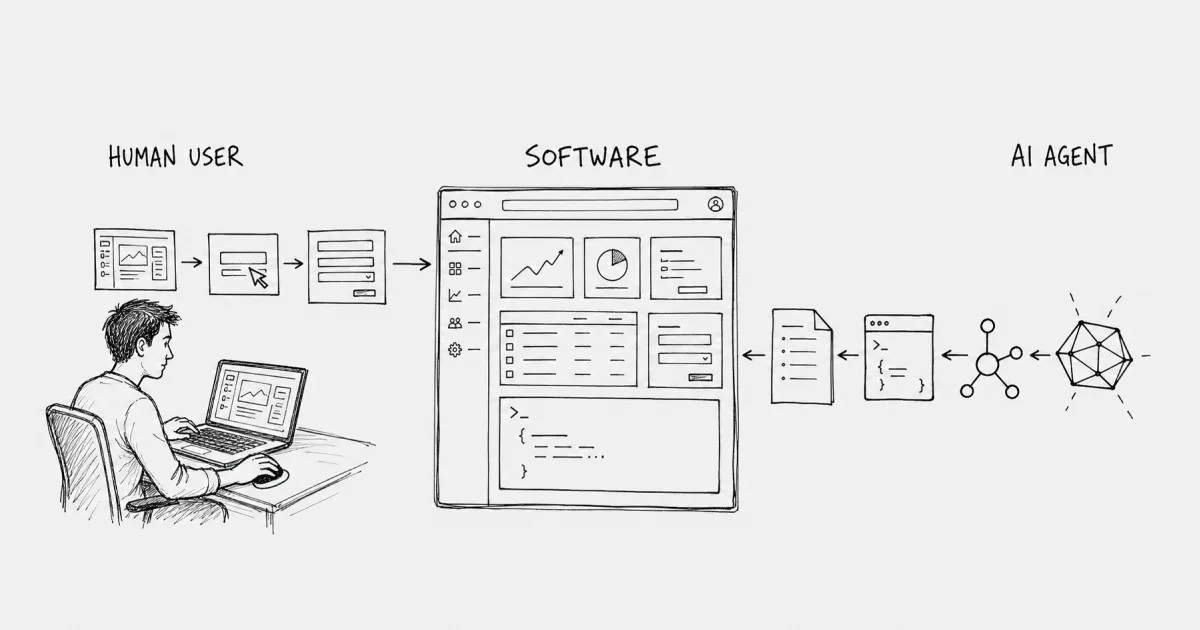
Software has always assumed a human on the other side. Every button, form, and authentication flow was designed for a person clicking through screens. That assumption is now breaking.
AI agents are reading your documentation, calling your APIs, and attempting to complete tasks on behalf of users. They succeed or fail based on how your product is built. This article explains what agent users are, how they differ from humans and bots, where their journeys break, and what developer tool teams can measure to understand this new class of user.
The AI Agent as a New Class of Software User
AI agents are autonomous software actors that now use applications, APIs, and command-line tools directly instead of waiting for human input through visual screens. For decades, every button, menu, and form in software existed to help a person click, type, and navigate. That assumption is breaking.
An AI agent is software that pursues a goal and completes tasks on behalf of a user or another system. When an agent reads your documentation, calls your API, and attempts to finish a job, it functions as a user of your product. The fact that it is also software does not change this reality.
So what makes an agent a user rather than just another service calling your backend? Four characteristics set agents apart:
- Autonomy: The agent acts without step-by-step human instruction. It decides what to do next.
- Goal orientation: The agent attempts to complete a specific task, not just retrieve data.
- Tool use: The agent reads documentation, calls APIs, and may invoke MCP tools to accomplish its goal.
- Reasoning: The agent interprets results, handles errors, and adjusts its approach based on what it learns.
Put together, these characteristics mean agents behave more like humans than like traditional bots. They have intent. They can succeed or fail at what they came to do. And right now, most teams have no way to tell the difference.
How Agent Users Differ From Human Users and Bots
You might be wondering: how is this different from a web crawler or a script hitting my API? The distinction matters because it changes what you measure and what you optimize.
Human users browse pages, follow sessions, and interact through visual interfaces. Product analytics was built for them. Bots scrape or crawl without intent to complete a task. They index content or check uptime. Agents sit somewhere in between: they reason toward task completion, but they do not follow the session-based behavior that analytics tools expect.
Behavior | Human User | Bot | Agent User |
|---|---|---|---|
Browses pages | Yes | Yes | Sometimes |
Has intent to complete task | Yes | No | Yes |
Uses API programmatically | Rarely | No | Yes |
Follows session/cookie model | Yes | No | No |
This table clarifies why existing tools struggle with agent traffic. Product analytics tracks sessions and pageviews. Observability tracks API calls and error codes. Neither reconstructs the task an agent was trying to complete, which means the intent disappears into noise.
What an AI Agent Does Inside a Developer Product
Picture an agent working on behalf of a developer. The goal: integrate a payment API into an application.
The agent starts by reading your documentation to understand what the API does and how authentication works. It finds an OAuth flow, attempts to authenticate, and hits a redirect designed for a human in a browser. The agent cannot complete the redirect. It retries, receives a 401, and looks for an alternative path.
Next, it tries calling the API directly with an API key it found in the docs. The call fails with an undocumented error code. The agent has no way to interpret the failure. After two more retries, it abandons your product and tries a competitor whose documentation was clearer.
Your server logs show bot traffic, a few 401s, and some failed API calls. The task itself never appears. You have no record that an agent evaluated your product and chose someone else. No demo request. No sales email. No lost-deal reason in your CRM. The opportunity ended before your funnel started.
Types of AI Agents Developer Tool Teams Encounter
Different agents interact with developer tools in different ways. Understanding the categories helps you anticipate what they attempt and where they fail.
Coding and IDE Agents
Agents embedded in IDEs, like Cursor and GitHub Copilot, query documentation and APIs to help developers write code. When a developer asks the agent to integrate your SDK, the agent reads your docs, generates code, and may call your API to verify the integration works. If your docs are unclear, the generated code fails, and the developer moves on.
MCP Tool Use Agents
MCP stands for Model Context Protocol. It provides a structured way for agents to discover and invoke tools. Agents using MCP look for tool definitions, understand what each tool does, and call them to complete tasks. If your product exposes MCP tools, these agents can interact with it directly without parsing documentation first.
Research and Retrieval Agents
Some agents read documentation and public content to answer questions or compile information. They may not call your API at all, but they still evaluate your product based on what they can parse from your public surfaces. If your docs are written for humans only, these agents extract little useful information.
Workflow and Automation Agents
Workflow agents chain multiple API calls together to execute multi-step jobs. They might authenticate, retrieve data, transform it, and push it to another service. Each step is part of a single task, and a failure at any point means the whole task fails.
The Agent Journey Across Docs, Authentication, APIs, and MCP
The agent journey is the sequence of surfaces an agent touches when attempting a task. This is distinct from a human funnel. There are no pageviews to count, no form submissions to track. The journey happens across docs, auth flows, APIs, and MCP tools, often in a single session that your analytics cannot reconstruct.
Documentation as the Entry Point
Agents often start by reading docs to understand what your product does and how to use it. If your documentation is written for humans, with instructions like "click the button" or content that relies on screenshots, the agent gets no usable information. Machine-parseable documentation is the entry point for agent users.
Authentication and OAuth Flows Built for Humans
Most authentication flows assume a human in the browser. OAuth redirects, CAPTCHA challenges, and session requirements block agents entirely. An agent cannot click through a consent screen or solve a visual puzzle. If your auth flow requires human interaction, agents fail at this step and have no way to proceed.
API Calls, Retries, and Silent Failure
When an agent calls your API and receives an error, it retries. If the error code is undocumented or unclear, the agent cannot recover. After a few attempts, it abandons the task silently. Your server logs show failed requests, but you have no signal that a task was attempted and lost. The agent simply disappears.
MCP Tools and Structured Access
MCP tools give agents a structured way to discover and invoke capabilities. Instead of parsing documentation and guessing at API calls, an agent can query available tools, understand their parameters, and call them directly. Products with well-defined MCP surfaces are easier for agents to use, which means higher task completion rates.
What Product Analytics and Observability Miss About Agent Traffic
Product analytics assumes a person moving screen by screen: a session, a pageview, a funnel step, a form submit. That model breaks when the actor is an agent.
An agent evaluating your SDK does not behave like a visitor. It may scrape docs, bounce off an auth wall built for browsers, call several API endpoints, then open an MCP session, all as one job. Your tools record bot noise, fragmented sessions, and a few 401s. The task itself never appears.
Here is what each tool records versus what disappears:
- Product analytics records: pageviews, sessions, button clicks
- Product analytics misses: agent intent, task context, whether the task succeeded
- Observability records: API calls, error codes, latency
- Observability misses: which calls belong to the same task, what the agent was trying to accomplish
Developer-tool companies still cannot reliably tell which traffic is an agent, what that agent came to accomplish, or where the attempt died. That is not a vanity metric gap. It is conversion leaking through surfaces you already ship without a system that treats them as one journey.
Agent Task Completion Rate as the Unit of Progress
Pageviews were never the unit of progress for agent users. The completed task is.
Agent Task Completion Rate is completed agent tasks divided by agent tasks started. This metric answers a simple question: did the agent finish the job it came to do? A chart of "agent visits" would get absorbed into general analytics. The metric that matters is whether the task succeeded.
Agents show up when buyers research tools, when coding agents choose integrations, and when autonomous systems run workflows overnight. In every case, software is acting on your product. If you only measure human clicks, you miss the decision entirely.
Where Agent Journeys Break on Public Surfaces
Agent journeys fail at predictable points. These are observable, fixable problems on surfaces you already control.
Human Only Documentation
Documentation written for human readers gives agents no usable information. Instructions like "click the button," content that relies on screenshots, and videos without transcripts are invisible to agents. Machine-readable structure, clear API references, and explicit parameter definitions matter more than visual design.
OAuth and Session Assumptions
Authentication flows requiring browser redirects or human interaction block agents entirely. If your auth assumes a person in the loop, agents cannot proceed. API key authentication or machine-to-machine OAuth flows provide paths that agents can actually complete.
Undocumented API Errors
Agents cannot recover from error codes that lack clear explanations in documentation. If your API returns a 422 with no description, the agent has no way to fix the request. It retries, fails again, and abandons the task. Clear error messages with actionable guidance allow agents to self-correct.
Missing or Inconsistent MCP Surfaces
Products without MCP tools or with inconsistent tool definitions force agents to guess or abandon. If your MCP surface is incomplete, or if tool parameters do not match your API documentation, agents may try and fail without a clear signal of what went wrong.
What Developer Tool Teams Can Do About Agent Users Today
Teams can audit their public surfaces for agent accessibility. This means reviewing documentation for machine-readability, checking authentication flows for agent compatibility, examining API error responses for clarity, and evaluating MCP tool availability.
- Audit documentation: Check whether docs are machine-parseable, with clear API references and explicit parameter definitions.
- Review authentication: Identify flows that require human interaction and consider alternatives for agent access.
- Check API errors: Ensure error codes have clear explanations that allow agents to self-correct.
- Evaluate MCP tools: Confirm tool definitions are complete and consistent with API documentation.
Phineus offers an Agent Traffic Blindspot Report for teams that want to understand their current agent traffic and surface readiness. The report shows where agent demand disappears inside conventional analytics and provides a framework for measuring task-level outcomes.
Frequently Asked Questions About Agent Users of Software
Are AI agents considered software users or software themselves?
AI agents are software, but when they interact with your product to complete a task, they function as users. The distinction matters because their behavior requires measurement and optimization like any other user segment.
How can teams identify agent traffic without perfect fingerprinting?
Teams can identify likely agent traffic through patterns like user-agent strings, request timing, API-only sessions, and behavior that skips human-oriented flows. Perfect identification is not required to measure and improve agent task completion. Patterns are enough to start.
Is optimizing for agent users the same as SEO for LLMs?
LLM SEO focuses on appearing in AI-generated answers. Agent optimization focuses on whether an agent can successfully complete a task using your product. The surfaces overlap, especially documentation, but the goal is task completion rather than visibility.
Does a product need MCP to support agent users?
MCP provides a structured path for agent tool use, but agents also interact with documentation and APIs. Products without MCP can still support agent users by making docs machine-readable and APIs well-documented. MCP makes the path clearer, but it is not the only path.