

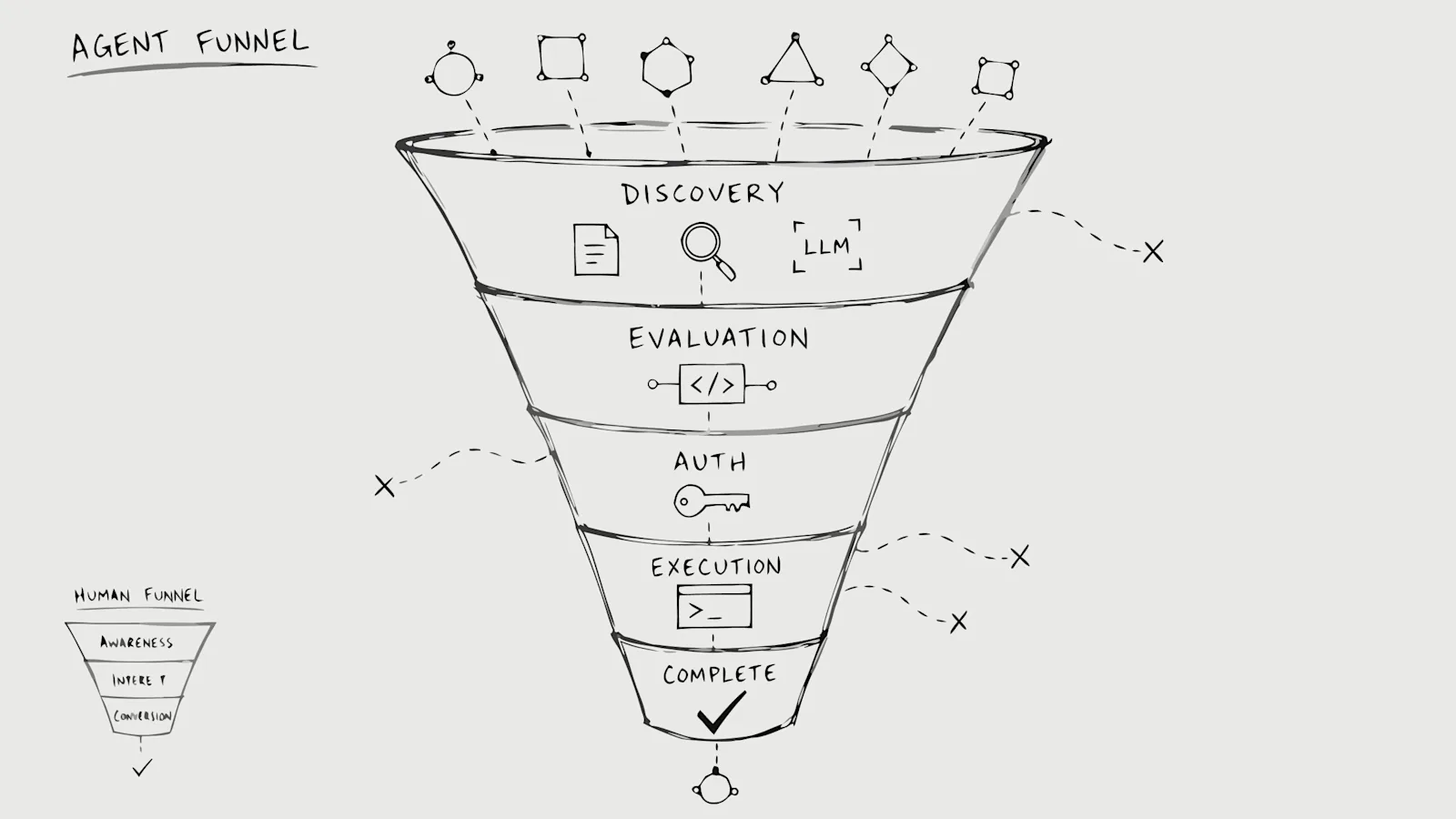
An AI agent evaluating your product does not browse like a human. It reads your docs, checks your API specs, attempts authentication, calls your endpoints, and either completes its task or silently switches to a competitor. Your analytics records fragments of this journey, but the task itself never appears.
This article walks through each stage of the agent funnel, where these journeys break, what existing tools miss, and how to measure the metric that actually matters: whether the agent finished the job it came to do.
What is the agent funnel
The agent funnel is the sequence of stages an AI agent moves through when trying to use your product to finish a job: discovery, evaluation, authentication, task execution, and completion or abandonment. Each stage compounds on the one before it, and errors at any point cause the agent to fail or leave. The unit of progress is the completed task, not the pageview.
Human funnels assume someone clicking through screens, reading copy, weighing options. Agents skip most of that. They parse documentation, check API specs, attempt authentication, call endpoints, and either finish the work or quietly switch to another vendor. If you only measure human clicks, you miss the decision entirely.
Stages of the agent funnel from discovery to task completion
Discovery through docs, search, and LLM context
Agents find products differently than humans do. They crawl documentation, appear in LLM training data, or get referenced directly in prompts by the humans or systems deploying them.
Ads and landing pages rarely enter the picture. What matters at discovery is whether your product is findable in machine-readable form. If your docs are prose-heavy with no structured examples, an agent may never understand what you offer. If your product appears in an LLM's context window because it was mentioned in training data or a prompt, that counts as discovery too.
Evaluation of APIs, authentication, and MCP tools
Once an agent discovers your product, it evaluates whether the product can actually complete the task at hand. This means reading API specs, checking authentication requirements, and looking for MCP server availability.
MCP (Model Context Protocol) is a protocol that lets agents interact with external tools and data sources in a standardized way. Agents increasingly look for MCP servers when evaluating products. If yours is missing or misconfigured, the agent may move on to a competitor that has one.
Authentication and access
Authentication is where many agent journeys break. OAuth flows, redirect-based auth, CAPTCHAs, and browser-based verification all assume a human sitting at a screen. An agent hitting these walls often cannot proceed.
API keys and token-based auth tend to work better for agents, though even these can fail if the documentation is unclear or the flow requires manual steps. The question at this stage is simple: can the agent get access without human intervention?
Task execution across endpoints
If the agent clears authentication, it begins the actual work. This means calling API endpoints, invoking MCP tools, handling responses, and retrying on errors. A single task might involve dozens of requests across multiple endpoints.
Errors at this stage are common:
- Rate limits: The agent hits request caps and cannot continue.
- Malformed responses: The API returns data in an unexpected format.
- Undocumented edge cases: The agent encounters behavior not covered in the docs.
- Inconsistent naming: Endpoints or parameters do not match what the documentation described.
Some agents retry intelligently. Others fail silently and move on.
Task completion or silent abandonment
The funnel ends in one of two outcomes. Either the agent completes the task and moves on, or it fails and switches to another product.
The second outcome is the problem: there is no signal. No demo request, no support ticket, no lost-deal reason in your CRM. The opportunity ended before your funnel started. Silent abandonment is the default failure mode for agents. They do not complain. They do not email support. They just leave.
How the agent funnel differs from the human marketing funnel
The stages of a human funnel (awareness, interest, consideration, decision) do not map cleanly to agent behavior. Agents compress or skip most of these stages entirely.
Human Funnel Stage | Agent Funnel Equivalent |
|---|---|
Awareness (ads, content) | Discovery (docs, LLM context, search) |
Interest (landing page visit) | Evaluation (API spec parsing, auth check) |
Consideration (demo, trial) | Task attempt (endpoint calls, MCP tool use) |
Decision (purchase) | Task completion or abandonment |
A human might spend weeks in consideration. An agent might evaluate and abandon your product in seconds. The timeline is compressed, and the signals are different.
Where agent funnels break
Documentation written only for humans
Prose-heavy documentation without structured examples, code snippets, or machine-readable specs confuses agents. If your docs explain concepts but do not show exactly how to call an endpoint, an agent may fail to understand what to do next.
Picture an agent trying to integrate your API into a customer workflow. It reads your docs, finds a paragraph explaining the concept, but no code example showing the exact request format. The agent guesses, gets a 400 error, and moves on.
OAuth flows that assume a browser
Redirect-based authentication with CAPTCHA or human verification blocks agent access entirely. These flows were designed for people with browsers, not software making API calls.
Even well-documented OAuth can fail if the flow requires a human to click "Authorize" in a browser window. The agent has no browser. It has no way to click.
Ambiguous or undiscoverable API endpoints
Inconsistent naming, missing OpenAPI specs, or endpoints not linked from documentation all create friction. If an agent cannot find the right endpoint, it cannot complete the task.
This happens more often than you might expect. An endpoint exists, works fine, but is not mentioned in the docs or is named differently than related endpoints. The agent cannot infer what you did not document.
Missing or misconfigured MCP tools
Agents increasingly expect MCP servers. If yours is absent, misconfigured, or undocumented, the agent may choose a competitor that has one.
MCP is still relatively new, so many teams have not deployed it yet. But agents are already looking for it. The absence of an MCP server is becoming a competitive disadvantage.
What existing analytics tools record and what they miss
Product analytics and API observability each capture part of the picture, but neither reconstructs the task the agent was trying to complete.
- Product analytics: Records page hits, session duration, and user events. Agents appear as bot traffic or anomalous sessions with no clear intent.
- API observability: Logs requests, latency, and error codes. Shows a 401 but not why the agent was calling or what it wanted to accomplish.
- The gap: No tool connects the docs visit, the failed auth, and the subsequent API call into a single task attempt with a measurable outcome.
You might be thinking: can't I just filter for bot traffic and analyze that? The problem is that "bot traffic" is a bucket, not a category. It includes scrapers, indexers, and agents with real intent to use your product. Without task reconstruction, you cannot tell which is which.
Measuring agent task completion rate
Agent Task Completion Rate is the metric that matters here: completed agent tasks divided by agent tasks started. Did the agent finish the job it came to do?
Calculating this metric requires task reconstruction. Task reconstruction means connecting signals across docs, authentication, APIs, and MCP to infer what the agent intended. A single task attempt might span a docs page visit, an auth failure, a retry, and several API calls. Grouping these into one coherent attempt is the hard part.
Once you can measure task completion rate, you can start asking useful questions. Where do agents fail most often? Which barriers are fixable? Which agents are worth prioritizing?
How to instrument the agent funnel across docs, APIs, and MCP
Step 1: Identify agent traffic in your logs
Start by separating agent traffic from undifferentiated bot noise. Signals include user-agent strings, request patterns, header anomalies, and timing.
Agents often make requests in rapid succession with consistent patterns that differ from both humans and traditional crawlers. A human reads a docs page for 30 seconds, then clicks to another. An agent fetches 15 pages in 2 seconds, then hits your API.
Step 2: Reconstruct the intended task
Group related requests (doc fetch, auth attempt, API calls) into a single task attempt based on timing and context.
This is where most teams get stuck. The requests are in different logs, owned by different systems, and rarely correlated. Your docs site logs to one place, your auth service to another, your API gateway to a third. Stitching them together requires deliberate work.
Step 3: Connect signals across public surfaces
Link behavior across your docs site, authentication service, and API gateway to form a complete picture. If you have an MCP server, include those logs too.
The goal is a unified view of what the agent tried to do. Without this, you see fragments: a docs visit here, a 401 there, an API call somewhere else. The task itself remains invisible.
Step 4: Report task completion rate to the team
Surface the metric in a dashboard or report so product and engineering can act on it. Without visibility, no one owns the problem.
Tip: If you want to see where agent demand disappears in your current stack, the Agent Traffic Blindspot Report from GrowthOS provides a starting point for developer-tool and API-first teams.
Why the shift to agent task measurement matters now
Agent traffic is already visible in logs for developer-tool and API-first companies. The question is whether anyone is looking at it as a channel worth measuring.
Agents are moving from "look something up" to "do the work." Developer tools feel this first because agents already operate through docs and APIs. As agents start comparing vendors, running multi-step workflows, and making decisions without a human in the loop, the same blind spot will show up everywhere else.
Teams that learn to measure agent task completion early will understand demand that conventional analytics treats as noise. Teams that wait will keep optimizing human funnels while agent-driven demand quietly fails elsewhere.
Frequently asked questions about the agent funnel
How is agent traffic different from bot traffic?
Bot traffic typically scrapes or indexes content without intent to complete a task. Agent traffic represents AI systems actively trying to use your product on behalf of a user or operator to accomplish a specific goal. The distinction matters because agents have intent, and that intent can be measured.
Does agent funnel measurement replace product analytics?
Agent funnel measurement complements product analytics by covering a channel that session-based tools were not designed to track. Human users still benefit from traditional analytics. The two systems answer different questions.
What data is required to reconstruct an agent task?
Task reconstruction requires logs from your documentation site, authentication service, and API gateway, plus a method to correlate requests that belong to the same agent session. If you have an MCP server, those logs help too.
Can I measure the agent funnel without an MCP server?
Yes. MCP is one surface agents use, but task reconstruction works across docs and APIs regardless of whether you have deployed MCP tools. MCP just adds another signal to the picture.